Sauna V5.60 with Co-simulation Export
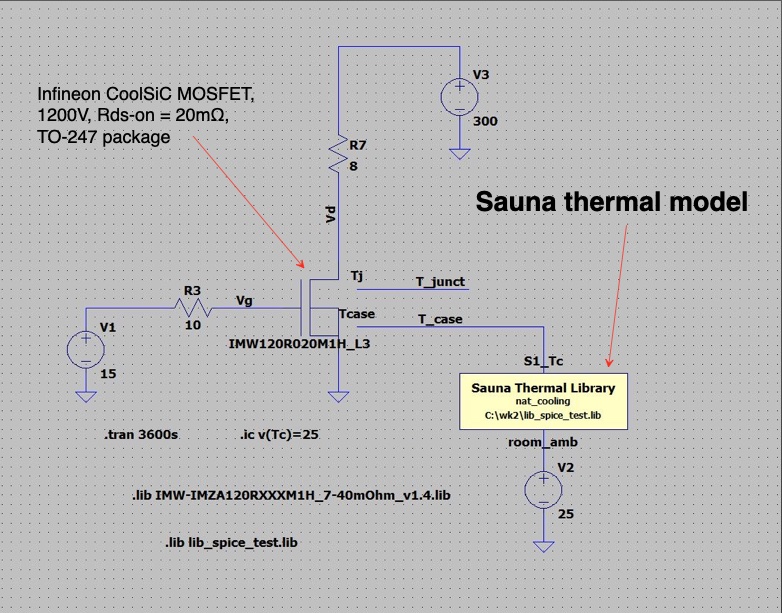
Sauna thermal model incorporated within LTspice circuit
Why export a thermal model to SPICE for co-simulation?
- Many electrical component properties are temperature-dependent
- resistance, including MOSFET Rds-on
- gain
- power dissipation
- Incorporating a thermal model in the SPICE analysis provides for a complete simulation under real world operating conditions
- Unlock the value of a thermal model
- you can do much more than simply checking if Tjunct-max is exceeded
- With a thermal model in a SPICE simulation, accurately simulate
circuit performance for:
- startup
- duty cycles
- thermal runaway
- voltage spikes
- thermal coupling effects
- thermal changes everything
Sauna is the ideal tool for generating and exporting a thermal model
- Sauna is based on the intuitive thermal resistor and thermal capacitor method
- No need to be a thermal analysis expert, 50% of users are electrical engineers
- Create models for heat sinks, boards and complete boxes
- Handles natural and forced convection and provides sophisticated radiation analysis
- Sauna models are compact, so the circuit simulation is not strongly impacted by additional complexity
Sauna export capability explained
- Easy to use
- calculate temperatures within Sauna first, which initializes all the resistances
- export only takes a second or two
- Can export a single thermal circuit or a library
- Create library with different cooling configurations
- different component layouts
- natural vs. forced air cooling
- different heat sink sizes
- metal vs. plastic boxes
- Component (heat source) options
- no limit on the number of heat sources
- do not have to model every heat source
- use distributed wattage to include heat load from non-critical components
- Thermal model symbol is exported with thermal circuit
- SPICE schematic only shows a simple block symbol
- details of subcircuit are hidden
- only connection points are heat sources and ambients
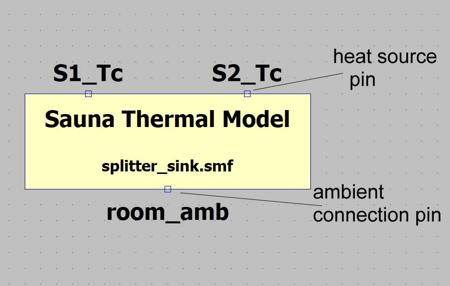
Thermal model symbol within LTspice
SPICE versions supported
- Directly supports LTspice
- widely used industry standard
- free download from Analog Devices
- Works with other SPICE versions as well, including PSPICE
- if not using LTspice, some user manipulation may be required, such as creating a symbol for the thermal circuit
- For co-simulation effect, need thermally enhanced component SPICE models
- thermally enhanced models available from Infineon, On Semi, Analog Devices, more
- some component models, particularly for older components, are not thermally enhanced
- can mix thermally enhanced and non-enhanced components in the co-simulation
Additional V5.6 feature: gap resistor improvement
- Can specify a special gap distance
- Provides modeling flexibility
- Can use for simplifying models for export
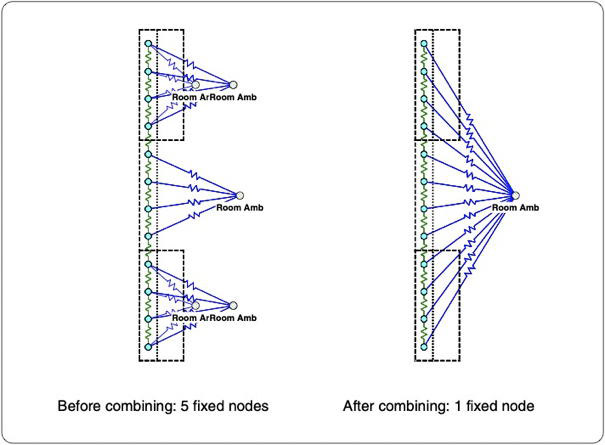
Easily combine ambients
Additional V5.6 feature: combine ambient tool
- When modeling, can somtimes create more ambients than necessary
- New feature makes it easy to combine multiple fixed node ambients into a single ambient
- Reduces clutter, model is easier to understand
Updated Sauna evaluation package
- Best way to learn about Sauna is to try the free evaluation package.
- Evaluation package now includes a co-simulation export sample problem. (LTspice required for co-simulation, free download.)
- To get the evaluation package, go to Sauna evaluation package download.
Sauna software, still affordable
- Sauna Standard $1,185 (USA/Canada)
- Sauna Modeling System (transient, duty cycle, larger models) $3,535 (USA/Canada)
- Co-simulation export available in both Sauna Standard and Sauna Modeling System
